In 2016, Harvard Business Publishing asked over 700 learning and development (L&D) practitioners if they thought their programs needed more innovation. Three quarters of them said yes.
Two years later, 80% of L&D pros said innovation was still lacking. Harvard seems to have stopped asking that question in 2018; the 2024 iteration of their L&D survey gets closest to the topic by finding that 38% (opens in a new tab) of L&D operators plan to build “capacity to innovate.”
At any rate, the timing scarcely matters. Innovation is always necessary in L&D.
The business environment never stops changing, and corporate learning has to innovate just to keep up. But how?
The field of traditional education has some answers, and one of them—perhaps the strongest—is Universal Design for Learning (UDL). Here’s an L&D-focused introduction to the three principles of Universal Design for Learning, including simple tips for implementing this powerful educational framework in your next workplace training program.
Not sure how to use UDL to improve your corporate training program? Try adding text to speech to your LMS. Contact us to get started.
Why L&D Needs the Universal Design for Learning Principles
Everyone learns differently. When you don’t give trainees what they need, they don’t learn. Every corporate training department should practice universal design because it gets results.
Universal Design for Learning is related to accessibility and inclusion, although it goes further than either in ways we’ll explain shortly).
But whether you employ any of the 1.3 billion people (opens in a new tab) who have a permanent disability or not, you will certainly train staff with temporary or situational disabilities—including a simple gap between your training program and a preferred mode of learning.
We know that 70% (opens in a new tab) of Gen Z uses subtitles when they watch TV, whether they have a hearing impairment or not. Sometimes the audio is unclear. Sometimes they need to keep their screens quiet. More than a quarter use subtitles as a focus aid.
The point is, subtitles were built for accessibility—and soon nearly a third of your employees may expect them as an option in training materials. If you don’t offer subtitles, these trainees may not meet learning outcomes.
That’s just one example of how UDL improves corporate training. So what is Universal Design for Learning?
Introducing UDL for Corporate Learning & Development
Then it looks at the human brain to identify the neurological networks related to learning.
Finally, it proposes science-backed guidelines for designing L&D content.
The end result is an approach to teaching that prioritizes inclusive design, equitable training, and accessibility for all.
That makes UDL sound like an accessibility program, but there are some key differences.
In the L&D industry, accessibility centers around accommodations, specific interventions that remove barriers for employees with disabilities.
Universal Design for Learning meets the same goal, but from a more universal perspective.
Accommodations are reactive; UDL is proactive.
Employees must ask for accommodations; UDL is available to all.
Accommodations layer assistive technology (AT) on top of digital learning environments; UDL builds these tools into that environment.
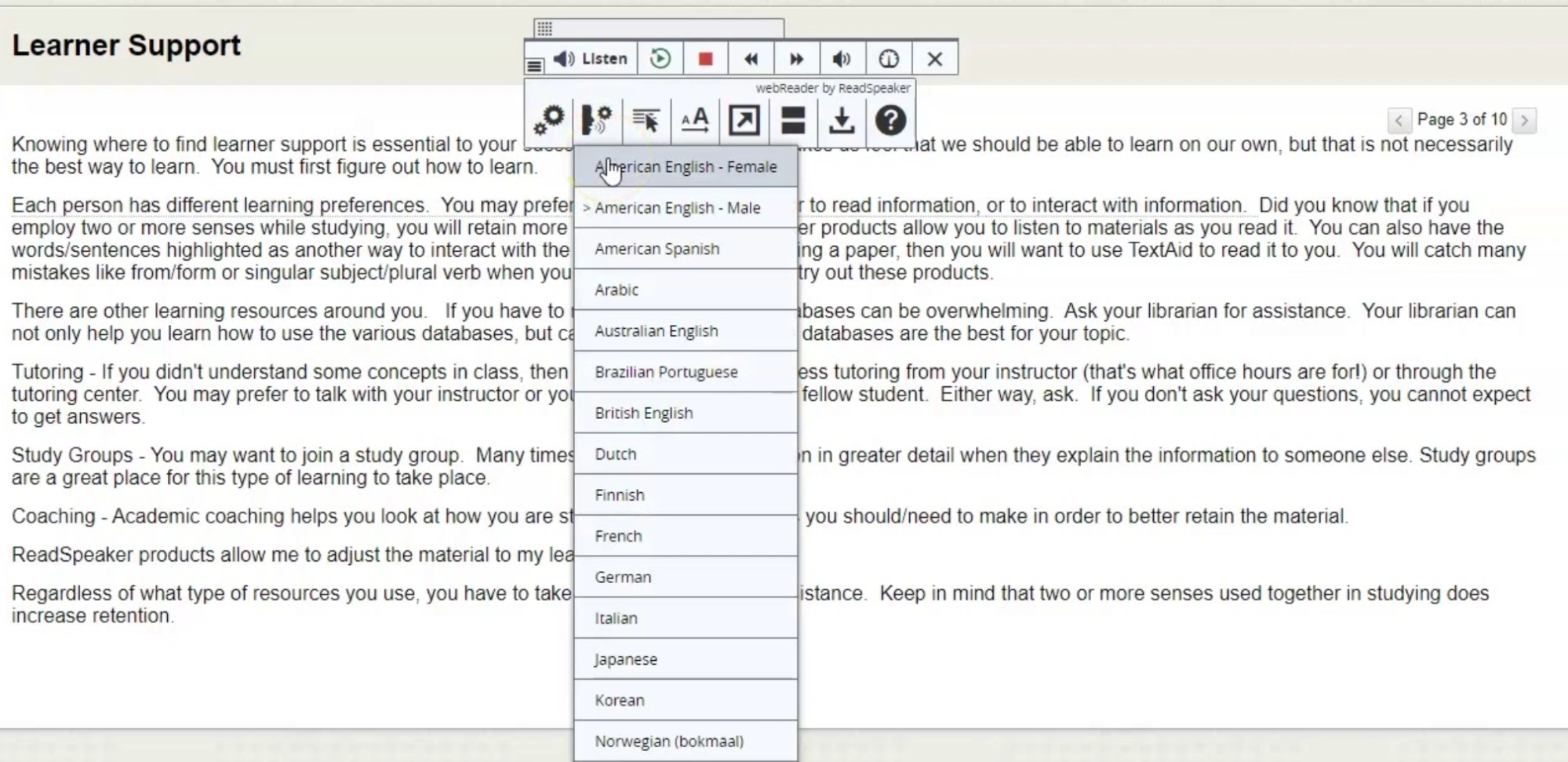
The core of UDL is learner choice. You offer multiple options that allow staff to control their own L&D experiences. A lot of these options grow out of the accessibility world—font reformatting, focus tools, text to speech (TTS)—but they find broader applications in the UDL framework.
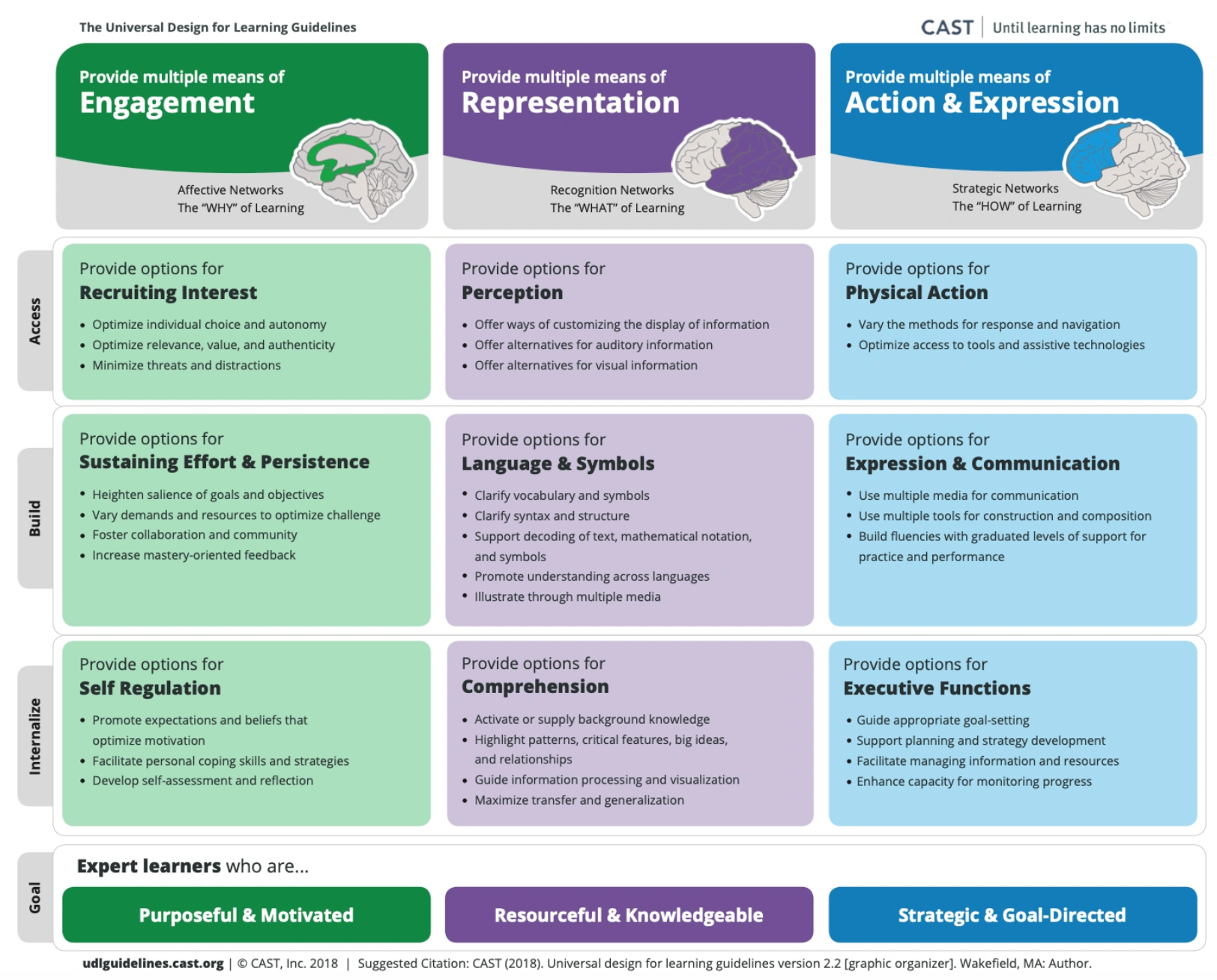
The UDL framework is organized around three neurological networks involved in learning. They are:
The Affective Network. This neural circuitry is associated with learner engagement. In UDL, we call it the WHY of learning, because network activity can manifest as motivation to learn.
The Recognition Network. This network involves the reception of information. It’s activated in interactions with the WHAT of learning: content and materials.
The Strategic Network. This one’s associated with the learner’s actions. It involves the way they express themselves, so it’s the key network related to assessments. We call it the HOW of learning. This network is activated when staff show how they’ve progressed in your training.
Universal Design for Learning provides guidelines for tapping into these networks successfully, leading to better learning outcomes. Essentially, the principles of Universal Design for Learning include multiple means of:
Engagement. Appeal to your staff’s Affective Network by offering multiple ways to engage with training content: reading, listening, watching, hands-on activities, etc.
Representation. Make your learning content available in multiple media: images, video, voice, etc. Trainees can then select the format that works best for them. That taps into the Recognition Network.
Expression. Corporate learning includes assessment: You present information, then ask staff to tell you what they’ve learned, appealing to their Strategic Networks. Give learners options for sharing their knowledge: writing, speech, media production, etc.
For most digital L&D platforms, you can provide multiple means of engagement, representation, and expression by creating Accessible Educational Materials (AEM). These are technology-based training tools that are “designed or enhanced so they can be used across all variabilities,” says Michelle Soriano, Accessibility Specialist at CAST, the nonprofit behind the foundational UDL research.
The simplest way to make all your training materials into bona fide AEM is to integrate UDL tools into your learning management system (LMS). And for that, you need ReadSpeaker’s UDL-friendly TTS solutions.
Text to Speech for UDL in Corporate Training
Remember our example about Gen Z and subtitles? Learners use lots of accessibility features in addition to subtitles, and that includes text to speech (TTS).
In fact, a 2022 survey found that 18% (opens in a new tab) of college students consider assistive technology (AT) to be “necessary”—while only 5% of them use AT to accommodate a disability. More than 25% said they need TTS specifically.
You may not be teaching college students, but the point stands, especially in light of UDL calls for multiple means of engagement and representation.
ReadSpeaker makes it easy to integrate lifelike TTS into your corporate learning platform. Our LMS integrations make TTS tools native to your system, so everyone can access them without opening new tabs or apps.
And ReadSpeaker solutions for corporate learning don’t stop with text to speech. They also include a suite of UDL tools, including:
Auto-translation
Multilingual AI voices
Customized pronunciation dictionaries (for perfect speech, even with jargon)
ReadSpeaker also offers speech production tools, which allow you to generate custom audio files at the keyboard. That means you can update training videos with new voiceovers as often as you like: No recording session required.
ReadSpeaker TTS solutions create multiple means of expression for all your training content. They place this capability at your staff’s fingertips. This leads to better learning outcomes for staff with all sorts of traits, including:
Neurodiversity
Dyslexia
Vision impairments
English as an additional language
Audio and multimedia learning styles
Frequent multitasking
A preference for listening
As the Universal Design for Learning principles teach us, one learner’s accommodation is another’s great user experience. By bringing ReadSpeaker TTS to your L&D platform, you give employees power over their own training experience—and that’s a core part of Universal Design for Learning.
Ready to bring UDL to your corporate learning program? Contact ReadSpeaker for a free TTS demo.
Discover how ReadSpeaker and CBTL support secure corporate learning with accessibility, data sovereignty, on-premise deployment and reliable text-to-speech technology.
Accessibility doesn’t end when a course is published. It continues throughout the learner journey. Discover how ReadSpeaker and Brickfield, as Certified Moodle Integrations, help institutions build accessibility into every stage of learning.